 |
| USB Host Cable |
If you shoot in studio or at home, it is always a good idea to have a large preview of your images. One option could be a laptop or PC, but more and more people are using 10inch tablets these days. They are much easier to carry around and they already offer great resolution and display quality.
If you have Canon EOS 6D, EOS 70D you can skip this article and just use the build-in WiFi with the
EOS Remote application.
I tested the tethering with my 5D mark III and Samsung Galaxy Note 10.1 . First of all you need an USB host cable. It is very cheap if you buy a noname one or you can buy the original Samsung ET-R205 (buy at
Sunnysoft.cz or
Amazon).
The next step is to choose an application from Google playstore. I tested a few, and ended up using
Helicon Remote which is working quite fine for me. You can fully control your DSLR with it, but I like to control my camera directly, so I'm using it only for image previews.
 |
| Camera Remote |
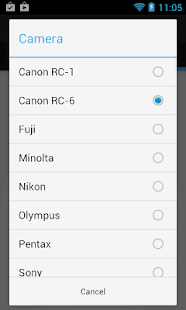
If you also need a wireless shutter, I found one application that works like a charm, and it is very easy to setup -
Camera Remote. It can fire all kind of cameras like Canon, Nikon, Fuji, Minolta etc. Great to have it as an option on your phone, instead of putting the shutter on 2s.
When you connect your camera to your tablet, it automatically detects it and you can start shooting.
If you want some special gear like tablet mount or fancy orange cable go to
tethertools.com, they have a wide variety of gadgets. So far they are offering a
tablet mount only for 1st generation of Galaxy Tab, which has a different size than the new 2014 edition.
And here it is what it looks like when I am shooting at home:
And the final image :)


